> ## Documentation Index
> Fetch the complete documentation index at: https://docs.blaxel.ai/llms.txt
> Use this file to discover all available pages before exploring further.
# Custom domains
> Expose Blaxel agents, sandboxes, MCP servers, and other resources through your own custom domain names with managed TLS certificates.
Blaxel allows you to connect your own domain names to your Blaxel workspace to use when exposing resources.
You can also share a verified preview custom domain with another workspace in the same account. The target workspace can use the shared domain for its own previews, while the shared copy stays read-only.
When you register a domain, you also enable the use of wildcard subdomains for that domain. For example:
* If you register `mycompany.com`, you can use any `*.mycompany.com` subdomain to create custom URLs.
* If you register `preview.mycompany.com`, you can use any `*.preview.mycompany.com` subdomain to create custom URLs.
* And so on.
Each domain is uniquely assigned to a region. For example, if `preview.mycompany.com` is registered in region `us-pdx-1`, it is not possible to use it in region `eu-lon-1` (for example) or any other region.
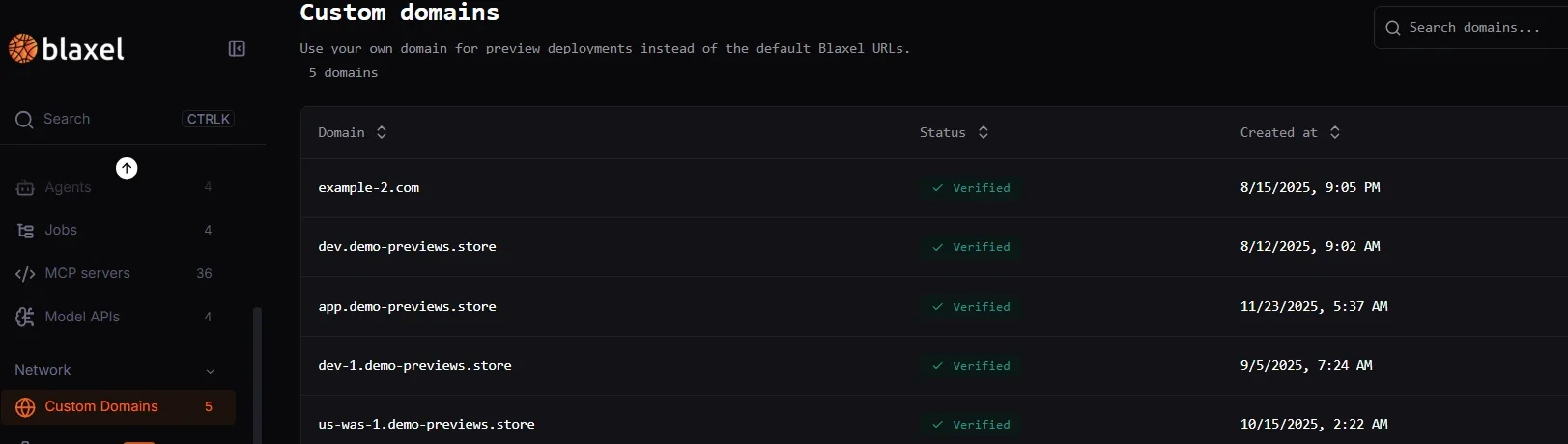
In the [Blaxel Console](https://app.blaxel.ai/), navigate to **Network** > **Custom Domains** in the sidebar and add a new custom domain. Then, you'll need to configure DNS records with your domain provider. Finally, verify from within Blaxel: after DNS propagation completes, your custom domain will become fully usable.
 ## Share a custom domain
After you verify a preview custom domain, you can share it with another workspace in the same account.
* Use a workspace share when one target workspace should get a read-only copy
* Use an account share when every workspace in the account should be able to use the domain
* Create previews from the target workspace after the share is in place
Only verified preview custom domains can be shared.
When a target workspace binds a preview to the shared domain, the full host still needs to be unique across the account. If another workspace already uses the same `.` host, Blaxel returns `409`.
## Use a custom domain
Custom domains can currently be used for:
* [Sandbox previews](../Sandboxes/Preview-url)
* Agents: coming soon!
* MCP servers: coming soon!
Related pages:
Create preview URLs and configure fallback routing for custom domains.
Review recent platform updates related to custom domains and previews.
## Share a custom domain
After you verify a preview custom domain, you can share it with another workspace in the same account.
* Use a workspace share when one target workspace should get a read-only copy
* Use an account share when every workspace in the account should be able to use the domain
* Create previews from the target workspace after the share is in place
Only verified preview custom domains can be shared.
When a target workspace binds a preview to the shared domain, the full host still needs to be unique across the account. If another workspace already uses the same `.` host, Blaxel returns `409`.
## Use a custom domain
Custom domains can currently be used for:
* [Sandbox previews](../Sandboxes/Preview-url)
* Agents: coming soon!
* MCP servers: coming soon!
Related pages:
Create preview URLs and configure fallback routing for custom domains.
Review recent platform updates related to custom domains and previews.